My First Vehicle
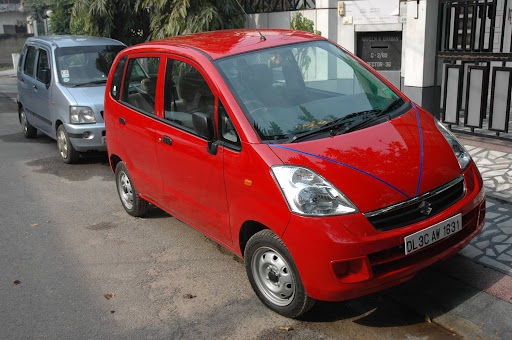
Zen Estilo
Lets start this with a small mental exercise.
There is this place where there are 2 parallel railway tracks. One track is old and isn't used anymore while another one is live and in use. There are 10 children playing on the live track. At the same time, a single child is playing all alone on the dead track. At this moment, a train is approaching on the live track putting the lives on the children on the live track in grave danger. Far from this place, you see this happening on your monitoring screen. The only control you have is the ability to switch the track temporarily so that the train goes on the dead track instead of the live one. Which would mean putting life of that single child into danger.
What will you do? Make up your mind before reading any further.
A majority of us would switch the tracks to save those 10 children at the expense of that single child. It seems right from the humanitarian perspective, saving as many lives as you can. If you did the same, read on to see this from a different perspective.
Why was that single child playing all alone on the dead track. Probably because he knew that the live track is dangerous. Who was doing the right thing by playing on the safe track? The single child. Who did the wrong thing? The 10 children by putting their own lives in danger by playing on the live track. And in your judgement, who gets punished? The one who was doing the right thing.
Second point - the 10 boys knew that they are on the dangerous track so they might flee on hearing the train noise etc. However, the single child, knowing that he is on the safe track will almost certainly not move and hence is in a much bigger risk.
So what is the moral of your judgement - Follow the crowd, Don't use your own brains to understand what is right.
Sadly, similar is the state of affairs in India. Decisions are not taken on what is right or what is better for development. Instead, its based on what would make maximum people happy. And while it is most fruitful if the general happiness of the people aligns with development of country , it is not always possible to do that, particularly in a country this huge.
Short term efforts are made just before the elections to make general people happy and gather the votes, while long term planning with no immediate benefits are left out.
In democracy, heads are counted, not brains.
2006 was the year of trips to me. And in what better way could it have ended than a 7 day trip to Kashmir.
Firdaus wasn't kidding when he said that this place is the paradise on earth. Though some people took those words a bit too literally and decided to open a route to directly reach the zannat from it.
Sarcasm apart, it was good to see that military tensions are much less in these areas at this time and our trip went very smoothly.
No amount of words are sufficient to describe this trip. Hence I would let the pictures do all the talking :-)


I just bought myself a Netgear WGR614 wireless router. I have heard that configuring wireless routers are pretty easy these days and any non-techy home user can do it easily. While this is a correct statement for most of the cases, unfortunately setting with a wireless router with Airtel broadband in India isn't straight-forward. Also, Airtel customer care helps you with installation the router only if you buy the router from them, which is of almost double cost of what is available in the market and also not of a standard company like Netgear or Linksys.
Without any further comments, here are the steps to make any DSL wireless router to work with Airtel modem Beetel 220BX.
Coz if you can't take care of yourself, you can't take care of anyone else.
Quote of the night, by Sanjay Goel :-)
Recently, yahoo messenger is been hit by the W32 Sohanad.B worm. Once it infects a computer, it uses the yahoo messenger of logged in user to send messages to friend list containing a link. Most of these links are for sites nsl-school.org or mytermex.com. If you ever get such a link from any of your friend, don't click on it or your system will be infected too.
As a practice, to safeguard yourself from any of such yahoo messenger viruses, always ask your friend first whether he has sent you any link before clicking on it.
If your system is infected with this virus, you would see frequent sign in/sign off or automatic status change to invisible. I have found few links to help you with removing this.
http://www.geocities.com/avsharath/Removing_W32_Sohana.B_Worm.htm - This seems like the most easy way of removing it. Download and merge the reg file, then delete the offending exe(s).
However, if this does not work for you, you can get a more comprehensive detail for removing it here or here.
P.S. I have found out that these nsl-school links that the virus spreads do not infect your computer if you open them in firefox. Looks like they exploit some IE vulnerability. I have always found it a good idea to make firefox my default browser :-).
Blogger recently launched a new beta version with new features like Labels, New Layout etc. As you might have noticed, this blog is now running on it.
The switching process was a breeze. The whole process including updating to a new layout based template took like 30 min, during which I played around with all the new things I could do with it.
The most important feature that compelled me to switch to this beta is the labels support. Now I can label my posts and clicking on a label takes you to all the posts with the same label. There is a labels box in the left hand sidebar which lists all the labels I have created. Hence readers interested in philosophical posts can find all of them together and need not be bothered with the tech posts. This feature was long overdue as most other popular commercial blog services provide it.
This feature also eliminates the need for me to maintain a separate tech blog. Its really difficult for me to maintain a separate tech blog, and hence I would not update the other blog anymore.
There have also been some changes in the template. There is a hierarchical blog archive on the left sidebar which provides much better navigation to the old posts.
Another change is the change in the feed url. In case you use a rss reader, please subscribe to this new feed url. There is also an option to subscribe to all comments on the blog. Or to comments of this individual post.
Overall, I'll give Blogger thumbs up for incorporating some long due changes which brings it at par with the commercial services out there.
Update 2/11/06: Looks like their is some issue with Blogger Beta feeds. The feeds do not show the date and time of the post when it was published. Instead it shows the last updated time of the post. I don't know whether its a feature or a bug but I liked it the earlier way.
Also, I have migrated my feeds to feedburner and updated the feed url links.

 Subscribe
