Saturday, December 17, 2005

Life should be easy

I believe that the basic stuff should always be easy to do so that one can concentrate on advanced stuff. But look at even the basic stuff of life, you move around in night and you catch cold, you eat a little extra and you get fat. Just maintaining a healthy body is the toughest task of the world. Add to it the little hobbies you want to pursue and see how much effort one has to put in each.
I remember at one of those corporate sessions, I was asked what I would I change if I was god. I said, I would give people the ability to pursue what they want, freed from all the unwanted responsibilities of their life.
Most people don't even know what they want to pursue in life and which way their life is going. But I don't blame them. The complexity of life is not easy to handle.

Wednesday, December 14, 2005

Spot the messenger

I absolutely hate MSN messenger, and I use it only because of friends and office colleagues. I am just waiting for the day when msn and yahoo collaboration is complete so that I wouldn't have to use the stupid msn messenger.
Why do I hate it so much? As an example, today when I booted my PC, I saw this:

But I hadn't launched the messenger yet. How come I got logged on to msn without my knowing? Clicking on the popup, I got:
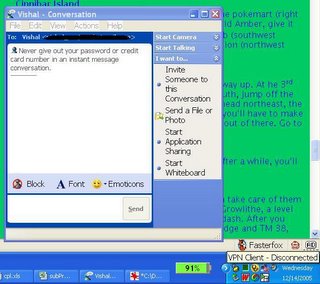

Trying spotting the messenger now in the taskbar/system tray. There is no icon of messenger. I didn't launch it. But still I am logged onto msn, the chat window is open. Knowing the looks (and checking the version), I know its Windows Messenger 4.7 that comes pre-installed with XP. The question is, first, why doesn't this Windows Messenger gets uninstalled when I installed MSN messenger 7.0? Why does MS windows keeps 2 copies of the same program. Second, if it will not uninstall automatically, why its there a manual way of uninstalling it. I have tried using "Add/Remove Windows Component" and what not, but the fact is, it will not uninstall itself, it will log you on without your knowing as soon as you get connected to internet thereby wasting your bandwidth and invading your privacy, and it will make you and your PC susceptible to chat and advertisement attacks.

This is the exact reason why I hate it (and why I haven't upgraded to msn messenger 7.5). So I found this great tool to remove Windows Messenger (though it still have msn messenger 7.0 installed due to friends/colleagues) .

BTW, http://messenger.msn.com doesn't work on firefox due to poor conformity to web standards.

Wednesday, December 07, 2005

Firefox 1.5 review

Okay, I installed Firefox 1.5, looks good and most of my extensions worked as well. And the ones that don't work, it is showing them as disabled so that I don't lose track of them. There is also an find update option on each extension so that if a future release of the extension is compatible with it, it would be downloaded and installed. I also found this useful link to tweak Gcache extension to work with it.

First impressions, I didn't find much difference between the older version and this. The options screen has changed and it has this really cool setting of "Force links that open windows to open in new tabs". I always find it annoying when clicking on a link opens up a new Firefox window. I liked the way opera had everything contained in itself. Now firefox supports the same feature.

Other than this there is nothing tangible that I can point out, and I still have to figure out some of the extensions stuff, but the web surfing just seems cooler ;-)

Update: Jus tnoticed that upgrading made it lose the search engines that I added. Also, there is no direct way of deleting those search engines (there is an extension though, but I am feeling lazy to google right now)

Wednesday, November 30, 2005

My Firefox Extensions

This is my last post using Firefox 1.0.x. Firefox 1.5 is out and I will waste no time to install it. Only thing I am skeptical about is whether all the extensions I use will work. So I am listing all the extensions here for now. I'll update the post to add descriptions of each extension later.

1. Flashgot - recommended. I use it with Free Download Manager.
2. Disable Targets for Downloads
3. GreaseMonkey
4. View Rendered Source Chart
5. View Formatted Source
6. Google toolbar for Firefox - recommended.
7. Tamper Data.
8. StumbleUpon
9. Gcache.
10. BookmarksHome
11. SessionSaver - heavily recommended.
12. Yahoo Toolbar
13. ScrapBook - recommended for offline users.
14. FasterFox
15. BugMeNot
16. Web Developer
17. FlagFox.
18. Adblock Plus

I have added recommended to extensions that I simply can't live without. This list and descriptions are likely to change though. Firefox 1.5, here I come.

Monday, November 21, 2005

Honesty and Pragmatism

As a child, we are taught to be honest, starting with all those stories of how a child admitted his mistake and was not punished ... Then as you grow up, you get to know how all this is termed foolish by the pragmatic world. Then you come to know that had the child not admitted his mistake, he would have anyways not got punished. You understand its better to give Rs. 50 to the traffic cop to avoid challan. And I am not talking being 'fraudi' here, just pragmatic.

I fail to understand why teach stuff which one has to unlearn anyways? Why should a parent teach something to his kid which neither he follows nor would he want his kid to follow in future?

Friday, October 07, 2005

Sites that should go ajax

Ajax is the latest buzzword in web based applications and after watching the wonder applications created out of it, I fully understand why. I still remember when I first saw google suggest and gmail, I had long discussions with my tech friends trying to figure out how they did it.
While there are lots of products getting developed on this from Web based IM clients to Complete Web Based Office suites, I have a few sites in mind that would be ideal candidates for getting re-designed using ajax.

  1. Live Cricket Score sites - Site gets refreshed after every ball being bowled and millions hitting the site and refreshing their browser trying to view the latest score. The kind of load these sites handle can be guessed by the fact that corporate internet connection is much slower on the cricket match day and companies like infosys have an intranet site to display the score (even that overloads) ... My point is ... If its just the score and a 1 line commentary that is updating every min, why refresh the whole browser and fetch non-changing information? If the request that currently fetched 100 kb from the server is made to fetch only 30 kb, the load would be much less.

  2. Admin Consoles of Application Servers like Weblogic - Such console provide lots of thick client type functionality and also refresh the browser a lot for showing the current status of various stuff. All those refreshes can be avoided and the interface would be much more better

  3. Siebel type applications - Avoid all that java stuff. Clean interface is the key
As and when I get more ideas, I would be posting it here. As of now, try Meebo, a web based IM client.

Monday, October 03, 2005

Indian official entry to Oscar is Paheli

I just couldn't believe my ears. When I wrote this post, not in my dreams had I thought that Black would not even be nominated for the coveted oscar. Anyone and his dog knows that paheli cannot win the oscar.
I really don't know what happens in those closed doors and I really cannot claim myself as an art critique but I certainly can call myself heart-broken as a Big B masterpiece goes down the drain.

